- 代辦事項:
- PreLoadering 動畫不管是否載入完成,均有最短時間
- Footer 的畫筆、咖啡杯、瀏覽量及訪客量需要修正
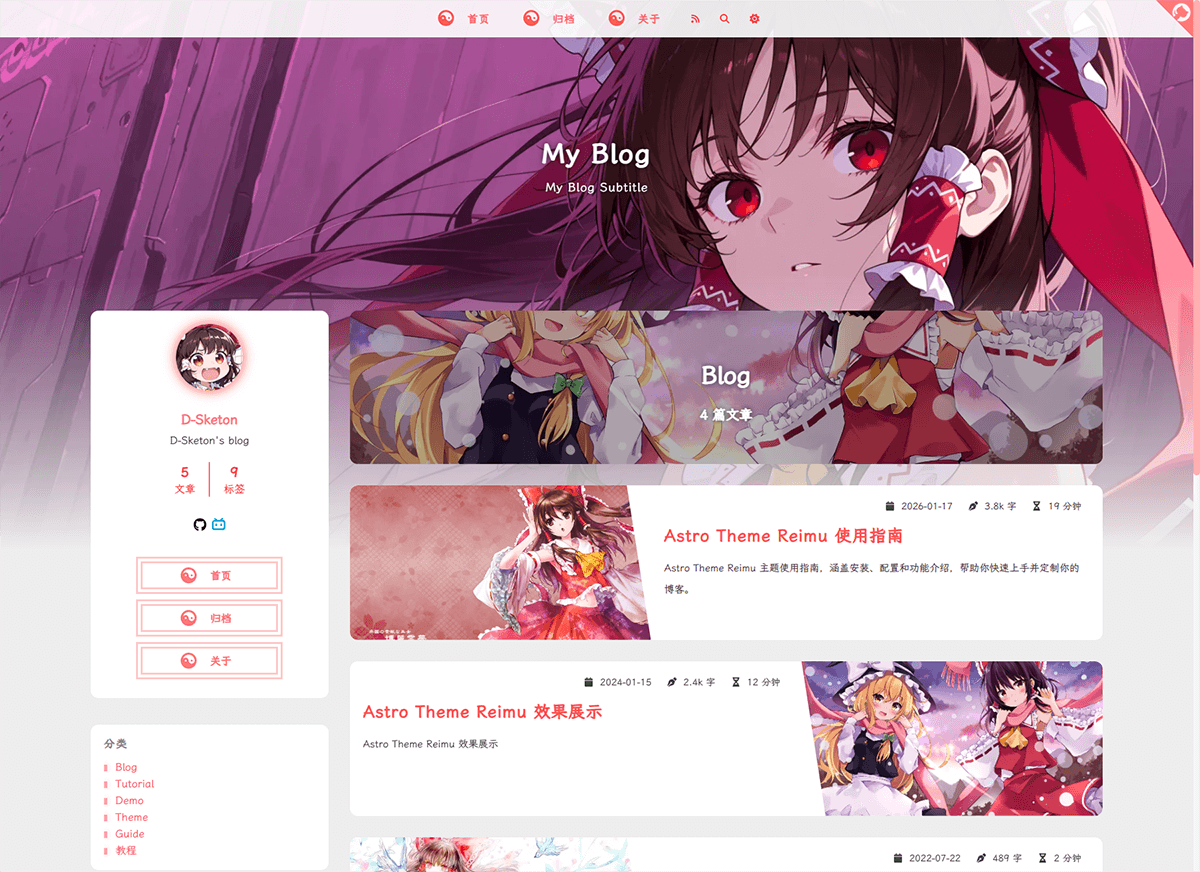
本主题是 hexo-theme-reimu 的 Astro 移植版本,一款博丽灵梦风格的 Astro 主题。
| framework | repository | version | stars |
|---|---|---|---|
| Hexo | hexo-theme-reimu |  |
 |
| Hugo | hugo-theme-reimu |  |
 |
| Astro | astro-theme-reimu |  |
 |
欢迎提交 ISSUE 和 PR!
- ✨ 完整的博客功能
- 📱 响应式布局
- 🌙 暗黑模式支持
- 🌍 多语言支持(i18n)
- 🖥️ 代码高亮(基于 Expressive Code)
- ➗ KaTeX 数学公式支持
- 📊 Mermaid 流程图支持
- 🔍 本地搜索(基于 Fuse.js)
- 💬 多评论系统支持:
- Valine
- Waline
- Twikoo
- Gitalk
- Giscus
- Disqus
- Utterances
- 📊 文章阅读统计(Waline/Valine)
- 👥 访客统计(不蒜子)
- 📈 网站分析:
- 百度统计
- Google Analytics
- Clarity
- 🖼️ 图片懒加载
- 🖼️ 图片灯箱
- ⚡ 加载动画
- 🎨 AOS 滚动动画
- 🎯 鼠标特效
- 📑 目录导航
- 📰 RSS 订阅
- 🎨 图标支持(FontAwesome、Iconify)
- 🔗 内置 mdx 组件:
- 内部链接
- 外部链接
- 友情链接
- 热力图
- 标签轮盘
- 标签页
- 照片墙
- ©️ 文章版权声明
- 🌐 响应式头图(srcset)
- 🎨 分享卡片功能
# 克隆仓库
git clone https://github.com/D-Sketon/astro-theme-reimu.git
cd astro-theme-reimu

# 安装依赖(推荐使用 pnpm)
pnpm install

# 启动开发服务器
pnpm run dev

# 构建生产版本
pnpm run build

# 预览构建结果
pnpm run preview/
├── public/ # 静态资源
│ ├── images/
│ │ ├── banner.webp
│ │ ├── banner-800w.webp
│ │ ├── banner-600w.webp
│ │ ├── favicon.ico
│ │ ├── reimu.png
│ │ └── taichi.png
│ └── robots.txt
├── src/
│ ├── components/ # Astro/React 组件
│ ├── content/ # 内容集合
│ │ ├── blog/ # 博客文章
│ │ └── config.ts # 内容集合配置
│ ├── hooks/ # React Hooks
│ ├── languages/ # i18n 语言文件
│ │ ├── en.ts
│ │ ├── zh-cn.ts
│ │ ├── zh-tw.ts
│ │ └── ja.ts
│ ├── layouts/ # 页面布局
│ ├── pages/ # 页面路由
│ │ ├── about.mdx # 关于页面
│ │ ├── archives/ # 归档页面
│ │ ├── blog/ # 博客页面
│ │ ├── categories/ # 分类页面
│ │ ├── tags/ # 标签页面
│ │ └── rss.xml.js # RSS 订阅
│ ├── plugins/ # Markdown 插件
│ ├── styles/ # 样式文件
│ ├── utils/ # 工具函数
│ ├── config.ts # 主题配置文件
│ ├── covers.ts # 封面图配置
│ └── env.d.ts
├── astro.config.mjs # Astro 配置
├── package.json
└── tsconfig.json
任何静态资产(如图像)都可以放置在 public/ 目录中。
所有博客文章都存储在目录 src/content/blog 中,关于页面存储在目录 src/pages 中。
编辑 src/config.ts 进行主题配置:
基本配置
export default {
  site: {
    title: "My Blog", // 站点标题
    subtitle: "My Blog Subtitle", // 站点副标题
    description: "Your blog description", // 站点描述
    keywords: "blog, astro, theme", // 关键词
    author: "Your Name", // 作者名称
    language: "zh-CN", // 站点语言 (en | zh-CN | zh-TW | ja)
  },
};export default {
sidebar: {
avatar: "/images/avatar.webp", // 头像路径(相对于 public 目录)
position: "right", // 侧边栏位置 (left | right)
},
};export default {
widgets: [
"category", // 分类
"tag", // 标签
"tagcloud", // 标签云
"archive", // 归档
"recent_posts", // 最近文章
],
};export default {
menu: [
{ name: "home", url: "/" }, // 菜单项名称(对应 i18n 翻译)
{ name: "archives", url: "/archives" },
{ name: "about", url: "/about" },
],
};export default {
banner: "/images/banner.webp", // 头图路径
// 响应式头图(可选)
banner_srcset: {
enable: true,
srcset: [
{ src: "/images/banner-600w.webp", media: "(max-width: 479px)" },
{ src: "/images/banner-800w.webp", media: "(max-width: 799px)" },
{ src: "/images/banner.webp", media: "(min-width: 800px)" },
],
},
};在 src/covers.ts 中配置随机封面图列表:
export default [
  "https://example.com/cover1.webp",
  "https://example.com/cover2.webp",
  "https://example.com/cover3.webp",
];
文章封面显示逻辑:
- 如果文章 Front Matter 中指定了
cover,则使用指定的封面 - 否则从
covers.ts中随机选择一张 - 如果
covers.ts为空,则使用头图作为封面
export default {
  footer: {
    since: 2020, // 起始年份(会显示为 2020 - 当前年份)
    powered: true, // 是否显示 "Powered by Astro"
    count: true, // 是否显示文章统计
    busuanzi: true, // 是否启用不蒜子访客统计
    icp: {
      icpnumber: "", // ICP备案号
      beian: "", // 网安备案号
      recordcode: "", // 网安备案链接中的recordcode参数
    },
    moe_icp: {
      icpnumber: "", // 萌国ICP备案号
    },
  },
};export default {
social: {
email: "mailto:your@email.com",
github: "https://github.com/yourname",
twitter: "https://twitter.com/yourname",
facebook: "https://www.facebook.com/yourname",
// 更多社交平台...
},
};评论系统
Waline 是一个简洁、安全的评论系统。
export default {
  waline: {
    enable: true,
    serverURL: "your-server-url", // Waline 服务器地址
    lang: "zh-CN", // 语言
    locale: {}, // 自定义语言包
    emoji: [
      // 表情包
      "https://unpkg.com/@waline/emojis@1.2.0/weibo",
      "https://unpkg.com/@waline/emojis@1.2.0/bilibili",
    ],
    meta: ["nick", "mail", "link"], // 评论者信息
    requiredMeta: ["nick", "mail"], // 必填项
    wordLimit: 0, // 评论字数限制(0 为不限制)
    pageSize: 10, // 每页评论数
    pageview: true, // 是否启用浏览量统计
  },
};
Valine 是一个基于 LeanCloud 的快速、简洁且高效的无后端评论系统。
export default {
  valine: {
    enable: true,
    appId: "your-app-id", // LeanCloud App ID
    appKey: "your-app-key", // LeanCloud App Key
    pageSize: 10, // 评论列表分页
    avatar: "mp", // Gravatar 头像风格
    lang: "zh-cn", // 语言
    placeholder: "Just go go", // 评论框占位文本
    guest_info: "nick,mail,link", // 评论者信息字段
    recordIP: true, // 是否记录评论者 IP
    highlight: true, // 是否高亮代码块
    visitor: false, // 是否显示访问量
    serverURLs: "", // LeanCloud 服务器地址(可选)
  },
};
Gitalk 是一个基于 GitHub Issue 和 Preact 的现代评论组件。
export default {
  gitalk: {
    enable: true,
    clientID: "your-client-id", // GitHub Application Client ID
    clientSecret: "your-client-secret", // GitHub Application Client Secret
    repo: "your-repo", // 存储评论的 GitHub 仓库
    owner: "your-name", // 仓库所有者
    admin: ["your-name"], // 仓库管理员(可以是数组)
  },
};
Giscus 是一个基于 GitHub Discussion 的评论系统。
export default {
  giscus: {
    enable: true,
    repo: "your-username/your-repo", // GitHub 仓库
    repoId: "your-repo-id", // 仓库 ID
    category: "your-category", // 分类名称
    categoryId: "your-category-id", // 分类 ID
    mapping: "pathname", // 评论映射方式
    strict: 0, // 严格模式
    reactionsEnabled: 1, // 启用反应
    emitMetadata: 0, // 发出元数据
    inputPosition: "bottom", // 输入框位置
  },
};
Twikoo 支持多种部署方式的评论系统。
export default {
  twikoo: {
    enable: true,
    envId: "your-env-id", // 腾讯云环境填 envId;Vercel 环境填地址(https://xxx.vercel.app)
    region: "", // 腾讯云区域(可选)
  },
};
Utterances 是一个基于 GitHub Issue 的轻量级评论组件。
export default {
  utterances: {
    enable: true,
    repo: "owner/repo", // GitHub 仓库
    issue_term: "title", // Issue 映射方式
    theme: "github-light", // 主题
  },
};
Disqus 是一个全球性的评论系统。
export default {
  disqus: {
    enable: true,
    shortname: "your-shortname", // Disqus shortname
    count: true, // 是否启用评论数量统计
  },
};
分析与统计
export default {
  analytics: {
    baidu_analytics: "your-baidu-id", // 百度统计 ID
    google_analytics: "your-ga-id", // Google Analytics ID
    clarity: "your-clarity-id", // Microsoft Clarity ID
  },
};
其他功能
export default {
  copyright: {
    enable: true, // 是否启用版权声明
    content: {
      author: true, // 显示作者
      link: true, // 显示文章链接
      title: true, // 显示文章标题
      date: false, // 显示发布日期
      updated: false, // 显示更新日期
      license: true, // 显示许可协议
      license_type: "by-nc-sa", // 许可协议类型
    },
  },
};export default {
preloader: {
enable: true, // 是否启用加载动画
text: "少女祈祷中...", // 加载文本
rotate: true, // 图标是否旋转
},
};export default {
friend: [
{
name: "Friend Name", // 友链名称
url: "https://friend.com", // 友链地址
desc: "Description", // 友链描述
avatar: "/avatar.webp", // 友链头像
},
],
};export default {
home_categories: {
enable: true, // 是否启用首页分类卡片
content: [
{
categories: "Blog", // 分类名称
cover: "/images/category-cover.webp", // 分类封面(可选)
},
],
},
};export default {
share: [
"weibo", // 微博
"qq", // QQ
"weixin", // 微信
// "twitter", // Twitter
// "facebook", // Facebook
// "linkedin", // LinkedIn
// "reddit", // Reddit
],
};export default {
sponsor: {
enable: false, // 是否启用赞助功能
qr: [
{ name: "支付宝", src: "/sponsor/alipay.jpg" },
{ name: "微信", src: "/sponsor/wechat.png" },
],
},
};export default {
outdate: {
enable: false, // 是否启用文章过期提醒
daysAgo: 180, // 多少天前的文章算过期
},
};export default {
firework: {
enable: true, // 是否启用鼠标特效
disable_on_mobile: false, // 是否在移动端禁用
options: {
// 详细配置请参考 mouse-firework 文档
},
},
};export default {
triangle_badge: {
enable: false,
type: "github", // 图标类型
link: "https://github.com/yourname",
},
};创建文章
在 src/content/blog/ 目录下创建 .md 或 .mdx 文件:
---
title: 你的文章标题
description: 文章描述
pubDate: 2024-01-01
updatedDate: 2024-01-02
cover: https://example.com/cover.jpg
tags:
  - tag1
  - tag2
categories:
  - category1
---

你的文章内容...
Front Matter 字段
| 字段 | 描述 | 类型 | 必填 | 默认值 |
|---|---|---|---|---|
| title | 文章标题 | string |
是 | - |
| description | 文章描述(用于 SEO) | string |
是 | - |
| keywords | 文章关键词(用于 SEO) | string[] | string |
否 | [] |
| pubDate | 发布日期 | Date |
是 | - |
| updatedDate | 更新日期 | Date |
否 | - |
| cover | 封面图 URL | string |
否 | - |
| tags | 标签列表 | string[] |
否 | [] |
| categories | 分类列表 | string[] |
否 | [] |
| excerpt | 文章摘要 | string |
否 | - |
| comment | 是否启用评论系统 | boolean |
否 | true |
| author | 文章作者 | string |
否 | - |
| toc | 是否显示目录 | boolean |
否 | true |
| sponsor | 是否显示赞助信息 | boolean |
否 | - |
| copyright | 是否显示版权声明 | boolean |
否 | - |
| share | 是否显示分享按钮 | boolean |
否 | - |
| outdated | 文章是否过期 | boolean |
否 | false |
数学公式
主题内置了 KaTeX 支持,可以直接在 Markdown 中使用 LaTeX 语法:
行内公式:$E = mc^2$块级公式:
$$
\frac{n!}{k!(n-k)!} = \binom{n}{k}
$$Mermaid 流程图
主题内置了 Mermaid 支持:
```mermaid
graph TD
    A[开始] --> B[处理]
    B --> C{判断}
    C -->|是| D[结束]
    C -->|否| B
```
代码块
代码块基于 Expressive Code 实现,支持:
- 语法高亮
- 行号显示
- 代码折叠(使用
collapse标记) - 代码复制按钮
```javascript
function hello() {
  console.log("Hello, World!");
}
``````js collapse={1-5, 12-14}
// 这些行默认折叠
function example() {
console.log("Hello");
}
// 这些行默认展开
const result = example();
```内置组件
主题提供了丰富的内置 MDX 组件:
用于在文章中创建指向其他文章的精美链接卡片,支持显示封面图和摘要。适合在文章中推荐相关内容或创建内容导航。
<Link slug="post-slug" title="文章标题" cover="封面URL" />Props:
slug(string, 可选): 文章 slugurl(string, 可选): 外部链接 URLtitle(string, 可选): 链接标题cover(string | "auto", 可选): 封面图片
用于创建指向外部网站的精美链接卡片,自动识别为外部链接。适合在文章中分享外部资源或推荐其他网站。
<Link url="https://github.com" title="GitHub" cover="auto" />展示友情链接列表,每个链接包含头像、名称和描述。适合在关于页面或专门的友链页面展示合作伙伴网站。
友情链接卡片使用全局配置中的友链列表:
<FriendCard />Props: 无
基于访问量数据生成热力图可视化,展示内容活跃度。适合在个人主页或数据统计页面展示访问数据。
<HeatMapCard levelStandard="1000,5000,10000" />Props:
levelStandard(string, 可选): 等级标准,默认 "1000,5000,10000"
以轮盘形式展示标签列表,用户可以点击随机选择标签。适合在标签页面或侧边栏增加趣味性交互。
<TagRoulette tags="标签1,标签2,标签3" icon="🎯" />Props:
tags(string, 可选): 标签列表,用逗号分隔,默认预设标签icon(string, 可选): 按钮图标,默认 "🕹️"
创建多标签页界面,可以在同一区域展示不同内容。适合展示相关内容的多个方面或选项卡式导航。
<Tabs active={1} center={false}>
  <TabItem title="Tab 1">内容1</TabItem>
  <TabItem title="Tab 2">内容2</TabItem>
</Tabs>
Tabs Props:
active(number, 可选): 默认激活的标签页,默认 1center(boolean, 可选): 是否居中,默认 false
TabItem Props:
title(string, 必需): 标签页标题
创建可展开/折叠的内容区域,可以隐藏次要信息。适合展示详细说明、代码示例或长文本内容。
<Details summary="点击展开">
  这里是折叠的内容
</Details>
Props:
summary(string, 必需): 折叠标题
创建响应式网格布局,可以灵活排列内容。适合展示卡片列表、图片网格或等宽内容块。
<Grid col={3}>
  <GridCell>单元格1</GridCell>
  <GridCell>单元格2</GridCell>
  <GridCell>单元格3</GridCell>
</Grid>
Grid Props:
width(number, 可选): 最小宽度,默认 240col(number, 可选): 列数,优先于 width
GridCell Props: 无
创建精美的图片展示墙,支持灯箱效果。适合在文章中展示多张图片或创建图片集页面。
<Gallery>


</Gallery>Props: 无
创建不同类型的提示信息框,支持多种样式。适合突出重要信息、警告或提示用户注意。
<AlertBlockquote type="info" title="提示">
  这是一个信息提示
</AlertBlockquote>

<AlertBlockquote type="warning">
  这是一个警告提示
</AlertBlockquote>

<AlertBlockquote type="danger">
  这是一个危险提示
</AlertBlockquote>
Props:
type("info" | "warning" | "danger" | "tip" | "important", 可选): 警告类型,默认 "info"title(string, 可选): 自定义标题,默认使用 type 大写
编辑 astro.config.mjs:
export default defineConfig({
  site: "https://yourusername.github.io", // 你的站点 URL
  base: "your-repo-name", // 子路径(如部署到 GitHub Pages)
  // ...
});- 构建项目:
pnpm run build- 将
dist/目录部署到 GitHub Pages
或者配置 GitHub Actions 自动部署(推荐),具体可参考 Github Pages。
这些平台会自动识别 Astro 项目:
在 src/pages/ 目录下创建文件即可,Astro 会自动处理路由。
样式文件位于 src/styles/ 目录:
base.stylus- 基础样式global.css- 全局样式markdown.stylus- Markdown 渲染样式- 其他样式文件...
语言文件位于 src/languages/ 目录,支持的语言:
en.ts- Englishzh-cn.ts- 简体中文zh-tw.ts- 繁体中文ja.ts- 日本語
要添加新语言,创建对应的 .ts 文件并参考现有文件的结构。
MIT